
Download Creatures Icons 2 – Monster Icons, Fantasy Creatures, Whimsical Desktop Icons
Overview
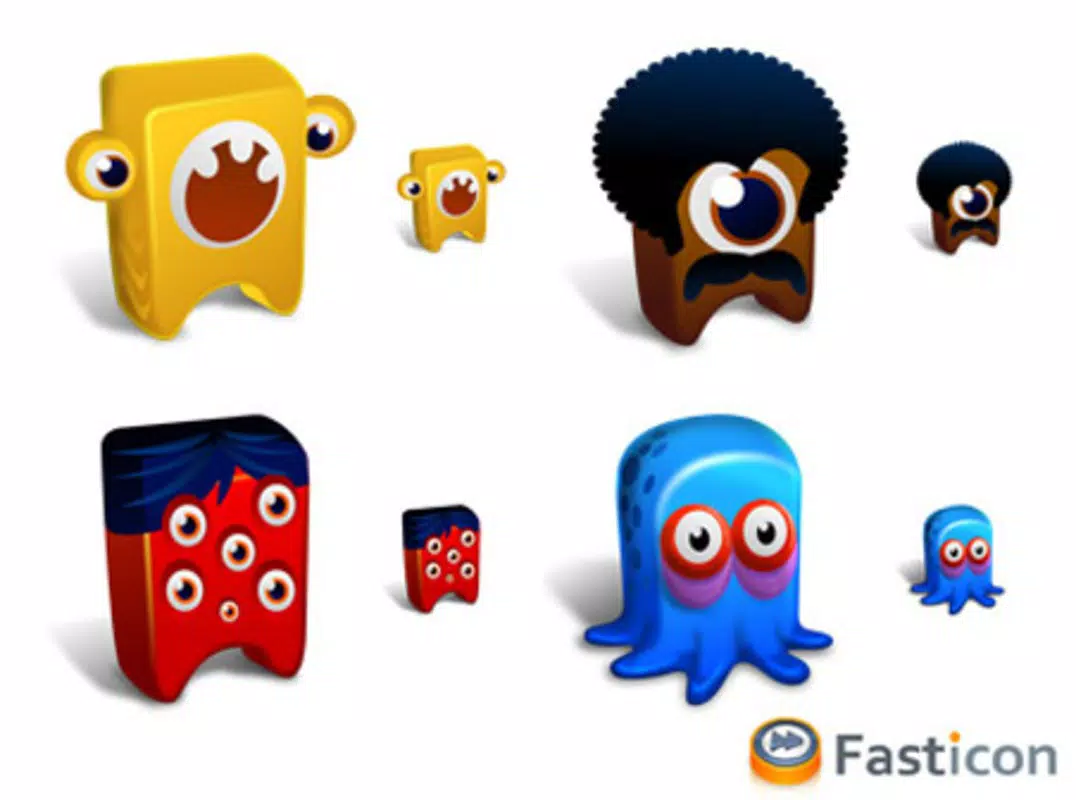
Creatures Icons 2 is a creative digital asset pack designed for users seeking expressive and imaginative visual elements for their digital environments. Developed by Dirceu Veiga, this collection serves as a sequel to the original Creatures Icons, expanding the roster with twelve unique monster characters, each imbued with distinct personalities and visual styles. The icons are crafted to function as avatars, profile pictures, or desktop icons, offering a whimsical enhancement to online platforms and personal workspaces.
The app targets individuals who value digital self-expression and appreciate well-designed, artistic assets. Whether used in messaging applications, forums, or as desktop icons, Creatures Icons 2 adds a playful and imaginative touch to digital identity. Its focus on character-driven design sets it apart from generic icon packs, appealing to users who enjoy fantasy-themed visuals and creative customization.
Although the developer did not provide additional technical details, the app’s long-standing presence since its release on September 13, 2009, suggests reliability and enduring relevance within niche digital art communities. It continues to serve as a valuable utility for users who prioritize visual flair and individuality in their digital interactions. The pack’s free availability further enhances its accessibility, making it a practical choice for hobbyists, content creators, and casual users alike.
Key Features & Functionality
- Unique Character Designs: Each of the twelve icons features a distinct monster character, including styles like Black and Pirate, with individualized traits and visual flair. These designs go beyond generic representations, offering users a range of expressive options based on mood or preference.
- Versatile Usage: The icons are optimized for multiple platforms and applications, allowing seamless use as avatars in instant messaging tools, profile pictures on forums, or icons in desktop environments.
- Desktop Customization: Users can transform their Windows desktop into a lively, fun space by replacing standard icons with these colorful, character-driven visuals, enhancing both aesthetics and personal expression.
- Easy Integration: Designed with simplicity in mind, the pack requires no complex setup. Users can apply the icons through standard file replacement or supported customization tools, making it accessible even for non-technical users.
- Artistic Collection: As a curated set of digital art, Creatures Icons 2 offers a unique blend of creativity and utility, standing out in a market saturated with standard icon packs.
For example, a user might choose the Pirate-themed icon for a gaming forum to reflect a playful persona, or use the Black character as a desktop shortcut to a favorite application, adding a touch of whimsy to daily workflows. The pack’s adaptability ensures it fits naturally into diverse digital ecosystems without requiring specialized software.
Interface, UX & Performance
The interface of Creatures Icons 2 is minimal, as it functions primarily as a static asset pack rather than a dynamic application. Users interact with the icons through file management tools, selecting and applying them via standard Windows customization methods. The visual style is consistent with whimsical, hand-drawn fantasy art, featuring bold colors and expressive character designs.
Navigating the pack involves locating the icon files and replacing existing system or application icons, a process that relies on user familiarity with Windows file systems. While the developer did not list formal performance metrics, the small file size of 3.2 MB suggests lightweight operation and minimal system impact. The pack is expected to perform reliably across a range of Windows devices, from older systems to modern machines.
Responsiveness and stability are likely maintained due to the static nature of the content—no runtime processes or background services are involved. Although the developer did not specify compatibility details, the long-standing release date indicates proven stability. Users should expect consistent behavior when integrating the icons into their preferred platforms.
Platform Compatibility & Technical Requirements
Creatures Icons 2 is designed for the Windows platform and is compatible with Windows operating systems. The software version is 1.0, and the file size is 3.2 MB. The app is available at no cost, making it accessible to a broad audience.
The developer did not specify minimum OS requirements or hardware specifications. However, given its lightweight nature and release date in 2009, it is likely compatible with most Windows versions from Windows XP onward. Users should verify system compatibility before installation, particularly on newer Windows releases where legacy file handling may require adjustments.
Pros and Cons
Pros
- Free to download and use, eliminating cost barriers for users.
- Twelve unique, character-driven monster designs with distinct personalities.
- Highly versatile—usable across messaging apps, forums, desktops, and online profiles.
- Small file size (3.2 MB) ensures quick download and minimal storage usage.
- Simple integration process with no complex setup required.
Cons
- Platform is limited to Windows; no information on iOS or Android availability.
- Developer did not provide detailed technical requirements or compatibility notes.
- Limited to static image files; no interactive or animated features.
- No official update history or support channel listed.
- Designs may not appeal to users seeking minimalist or professional aesthetics.
FAQ
Is Creatures Icons 2 free to use?
Yes, the app is available at no cost. There are no in-app purchases or subscription fees.
Can I use these icons on my Android or iOS device?
The developer did not specify compatibility with mobile platforms. The app is designed for Windows and may not function on Android or iOS devices without additional tools.
How do I install Creatures Icons 2 on my Windows PC?
Download the package, extract the files, and replace existing icons using standard Windows customization methods or third-party tools.
Are the icons safe to download and use?
As a free, static asset pack, the icons are generally safe. However, users should download from trusted sources to avoid potential malware.
Is there a way to update Creatures Icons 2?
The developer did not provide information about updates or future releases. The current version is 1.0, released in 2009.
Final Thoughts
Creatures Icons 2 remains a charming and functional tool for users who value creative expression and whimsical digital design. Its collection of twelve unique monster characters offers a playful alternative to standard icons, ideal for personalizing desktops, enhancing online profiles, or adding personality to messaging platforms. While it lacks modern features like animation or cross-platform support, its simplicity, small size, and free access make it a reliable choice for long-term use.
Users who enjoy fantasy-themed visuals, digital art, or desktop customization will find this pack to be a delightful addition to their toolkit. It’s especially suited for hobbyists, content creators, and anyone seeking to inject fun and individuality into their digital presence.
Despite its age, the app continues to serve its purpose effectively. Download Creatures Icons 2 now to bring a touch of whimsy to your digital world.


